• Home
  • Game
    Action Simulation RPG Sports Casual Cards Music Puzzle Shooting Romance
  • Apps
    Business Social Lifestyle Shopping Tools Travel Finance Education News Health
  • Articles

English 中文(简体) 中文(繁体) 한국어 日本語 Português Español Русский العربية Indonesia Deutsch Français ภาษาไทย
Home Apps Business Acrosync - a new rsync client
Acrosync - a new rsync client

Acrosync - a new rsync client

1
2
3
4
5
Download
  • Version 1.4
  • Category Business
  • Package Name com.acrosync.android.plus
  • Update Time September 28, 2026
  • Size 876.71KB
About this app

Enjoy millions of the latest Android apps, games, music, movies, TV, books, magazines & more. Anytime, anywhere, across your devices.

The best wifi sync app for Android is finally here!

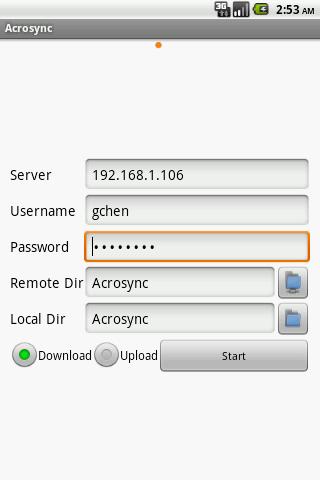
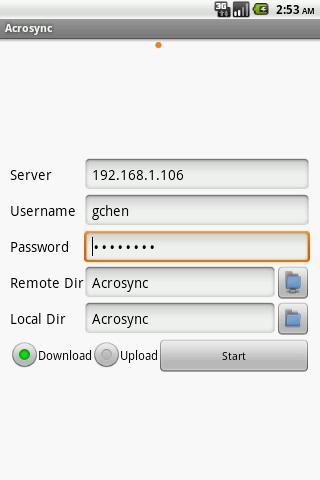
Wirelessly transfer photos, videos, music, and documents between your Android devices and computers, such as desktops, servers, NAS, or remote access accounts.

• Convenient and intuitive interface -- a single tap on your device starts the sync, without the need to physically access the computer.

• Fast and smart transfer -- only those newly created or modified files will be transferred. For a partially modified file, only the modified portion is sent over the network.

• State-of-the-art encryption – all network connection are protected against attacks even over insecure networks.

• File corruption never happens – file transmission is verified by MD5 checksums.

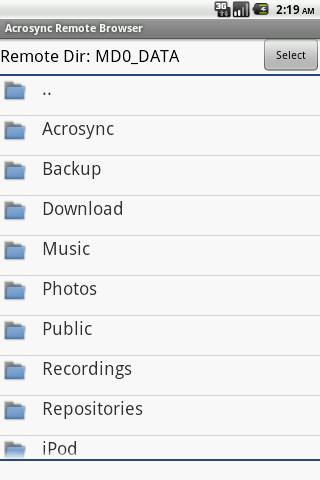
More amazingly, Acrosync does not require installation of proprietary server software. This is because Acrosync implements rsync, a mature open-source file sync protocol available on all platforms. By leveraging rsync, Acrosync can magically turn any computer into a file sync server without extra installation.

Requirements on the computers that Acrosync connects to:

• Linux computers must be accessible via ssh.

• Mac computers must have Remote Login enabled.

• For Windows computers, openssh and rsync must be installed, both of which are freely available as independent packages, or as part of cygwin.

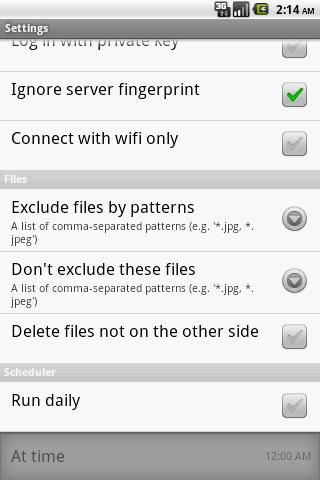
Advanced features, such as public-key login, file exclusion/inclusion by pattern, schedulers, are available via a single in-app-purchase (which also removes advertisements).

What's New in the Latest Version 1.4

Last updated on Sep 10, 2015 • Fixed a bug in uploading with deletion enabled.
• Private keys are now stored encrypted.
• File exclusion/inclusion fixed and tested.
Download(876.71KB)
Users also viewed
  • 3D Controller

    3D Controller

    1.0 September 27, 2026
  • LessPhone

    LessPhone

    8.0.1 September 27, 2026
  • FamiJoy-Family Files On Cloud

    FamiJoy-Family Files On Cloud

    2.1 September 26, 2026
  • CE

    CE

    29.0.0.564 September 25, 2026
  • Top city maps for MCPE

    Top city maps for MCPE

    1.0 September 25, 2026
  • Matrix Mobile

    Matrix Mobile

    3.7.1 September 25, 2026
  • Memminger-IRO

    Memminger-IRO

    1.6.5 September 24, 2026
  • Alt-C

    Alt-C

    2.0 September 24, 2026
  • BEEKS Beacon Maker

    BEEKS Beacon Maker

    1.6 September 23, 2026
  • Guide For Dinosaurs Mods

    Guide For Dinosaurs Mods

    1.0 September 22, 2026
  • Kinoni Remote Desktop

    Kinoni Remote Desktop

    2.7.7 September 22, 2026
  • dipit

    dipit

    2.0.0 September 21, 2026
  • PPT and Whiteboard Sharing

    PPT and Whiteboard Sharing

    3.1.1 September 21, 2026
  • Rick Hendrick Toyota

    Rick Hendrick Toyota

    3.3.1 September 20, 2026
  • Task Browser: Tangram

    Task Browser: Tangram

    0.9.30 September 19, 2026
About Privacy Policy Terms of Service Cooking Policy

© Copyright 2017-2026 downzs.com