
• Home
  • Game
    Action Simulation RPG Sports Casual Cards Music Puzzle Shooting Romance
  • Apps
    Business Social Lifestyle Shopping Tools Travel Finance Education News Health
  • Articles

English 中文(简体) 中文(繁体) 한국어 日本語 Português Español Русский العربية Indonesia Deutsch Français ภาษาไทย
Home Apps Tools AfterFocus
AfterFocus

AfterFocus

1
2
3
4
5
Download
  • Version 2.2.3
  • Category Tools
  • Package Name com.motionone.afterfocus
  • Update Time November 1, 2024
  • Size 50MB
About this app

Bring DSLR-like Photography to Your Smartphone

Thank you for your interest in our product AfterFocus.:)

Feel free to email to the developer for any bugs, suggestions and comments.

====================================================

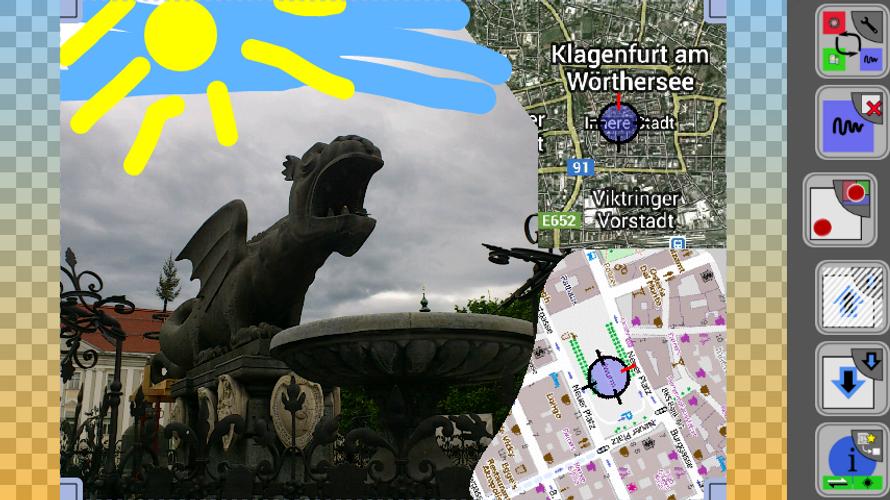
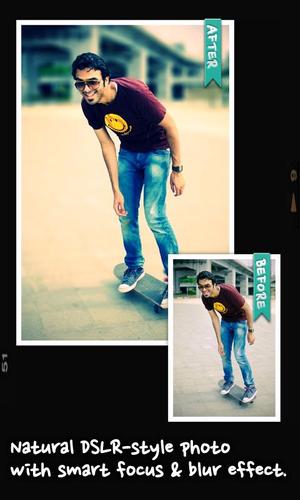
With AfterFocus, you can create DSLR-style background blurred photo by simply selecting focus area. Also, various filter effects offer you to create the most natural and realistic photo.

Selecting a focus area more precisely, you can achieve more natural and professional image.

Just mark the areas you want, AfterFocus automatically recognizes the focus area precisely even for an object with complex shapes.

This auto function allows you to work faster on smart phones with small screen.

Also, background blur effect of AfterFocus gives a photo the realistic look between the edge of the background and the focus area.

With our realistic filter effects, you will enjoy photographing and photo editing even more, and share them on SNS easily.

1. Smart focus area selection

Simply draw some lines inside a focus area and the background, then AfterFocus will automatically recognize the focus area. You can also select the area with traditional finger painting.

2. Background Blur effect

You can create the most realistic blur effect with various aperture styles just like DSLR camera.

To emphasize that certain things move, Motion blur effect is also available.

3. Filter effect

AfterFocus offers from basic effects to professional effects like Cross Process without looking artificial.

Also, you can emphasize the spot light on the background using Bokeh effect.

4. Easy share

You can share through e-mails and SNS easily and simply.
What's New in the Latest Version 2.2.3

Last updated on Feb 6, 2020 * Adds AI cut which detects human object automatically in an image
* Fix crash when opening an image outside AfterFocus app
Download(50MB)
Users also viewed
  • small lovely

    small lovely

    6.14 January 17, 2026
  • 360 Scene Mode

    360 Scene Mode

    1.1 January 17, 2026
  • Last Saved Contacts - Recently

    Last Saved Contacts - Recently

    1.15 January 17, 2026
  • PhoneWeaver LiveView plugin

    PhoneWeaver LiveView plugin

    3.0.0 January 17, 2026
  • Quick System Info

    Quick System Info

    1.8.8 January 17, 2026
  • Who reads my SMS?

    Who reads my SMS?

    2.0.0 January 16, 2026
  • Quake Alert: Track Earthquakes

    Quake Alert: Track Earthquakes

    2.5.3 January 16, 2026
  • KFVS12 First Alert Weather

    KFVS12 First Alert Weather

    5.15.411 January 16, 2026
  • Cinche Gallery

    Cinche Gallery

    1.2.1 January 16, 2026
  • Length Fraction Calculator

    Length Fraction Calculator

    1.1 January 16, 2026
  • Kansas City Weather Radar KCTV

    Kansas City Weather Radar KCTV

    v4.35.1.1 January 16, 2026
  • topksk

    topksk

    1.3 January 16, 2026
  • TV Universal Control Remote

    TV Universal Control Remote

    5.0.2 January 15, 2026
  • weather warnings and alerts

    weather warnings and alerts

    16.6.0.6271_50157 January 15, 2026
  • Ruqyah

    Ruqyah

    2.3 January 14, 2026
About Privacy Policy Terms of Service Cooking Policy

© Copyright 2017-2026 downzs.com