

Blank Stair takes all the work out of calculating a set of steps and ballusters
Blank Stair takes all the work out of calculating a set of steps.
This is two apps built into one. You get a staircase calculator and also a balluster spacing calculator.
STAIRCASE:
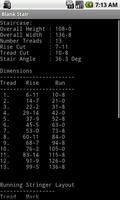
Enter overall height of the staircase and you will get:
* Overall width of the staircase
* Number of treads
* Riser height
* Tread run
* Staircase angle
* Staircase dimensions: the rise and run of each tread.
!* Running stringer points.
BALLUSTERS:
Enter the width of the opening (plus a few details about your ballusters and layout) and you get:
* Balluster count
* Spacing
* Layout position of each balluster
Answers are in INCHES-SIXTEENTHS format (i.e. 4-7 is 4 and 7/16"). That means no converting decimals to fractions on the jobsite.
It is FREE. Try it and love it.
QUICK TUTORIAL
STAIRCASE:
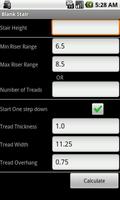
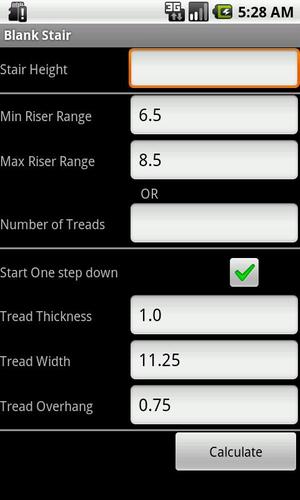
1. Run the app and click the STAIRCASE button.
2. Enter the overall staircase height. This is the height from the finished floor at the bottom to the finished floor at the top.
Risers:
3. EITHER enter an acceptable range for the riser height OR the number of treads desired for the steps. If you specify a range, the riser height will be close to the middle of the range. If you enter the number of treads, the range values are ignored.
4. Check or uncheck the 'Start One Step Down' checkmark. Most steps start 'One Step Down' from the top.
5. Enter the thickness of your treads.
6. Enter the width of the treads.
7. Enter the desired amount of overhang for each tread.
8. Click 'Calculate'
The next screen will give you the information about your stairs. Most of the infor is self-explanatory.
If you cut steps the old-fashioned way, just use the rise and run cut values from this page to mark your stringers.
However, a far superior method of marking stringers is to use the Running Stringer Layout. Here is a quick guide:
* Starting at the end of the board, make a mark at each point in the chart.
* Put your stop clamps on your framing square at the rise/run marks.
* For each tread, find the best place to fit the square between each set of marks. In a perfect world, the square will fit perfectly between each set of marks.
* Continue up the stringer, marking each tread, until all are marked.
Using this method eliminates marking errors. Nearly perfect stairs every time.
BALLUSTERS:
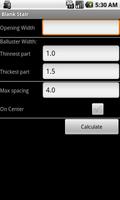
1. Run the app and click the BALLUSTERS button.
2. Enter the overall width of the opening.
Balluster width:
3. Enter the thinest part of the balluster. Often times, stair spindles vary in thcknness. measure along the balluster to find the thinnest part.
4. Enter the width of the balluster at the top/bottom. If (very unlikely) you have a balluster that is thicker in the middle than it is at the top/bottom, enter the thickness at the top.
5. Enter the maximum allowable spacing allowed between ballusters. Usually, this is 4 inches.
6. Check or uncheck weather you want the results to be 'On Center' or 'On Edge' layout.
7. Click 'Calculate'
The next screen will give you the information about your balluster layout.
TIP: If you are installing ballusters between several openings that are next to each other (like a deck rail), you should try to get the spacing between the ballusters in each section to match the spacing in the other sections. Here's how:
* Calculate the spacing for each section. Write them down.
* Usually there will be several sections that are either identical or very close. Settle on the most common spacing.
* Then, on the sections that do not match closely enough, adjust the 'Max Spacing' field and then recalculate that section. You may have to do this a couple of times in order to get the best spacing to match the other sections. It is OK if sections varys a bit from one another section. Minor variations are invisible to the eye.
Carpentry Carpenter Construction Contractor Guard Stair Balcony Wood Woodworking Bannister Spindles Pickets Handrail










 Download