• Home
  • Game
    Action Simulation RPG Sports Casual Cards Music Puzzle Shooting Romance
  • Apps
    Business Social Lifestyle Shopping Tools Travel Finance Education News Health
  • Articles

English 中文(简体) 中文(繁体) 한국어 日本語 Português Español Русский العربية Indonesia Deutsch Français ภาษาไทย
Home Apps Tools Capture Clipper
Capture Clipper

Capture Clipper

1
2
3
4
5
Download
  • Version 6.6.0
  • Category Tools
  • Package Name com.fangleness.captureclipper
  • Update Time February 21, 2026
  • Size 4.94MB
About this app

Clip your favorite web! You can save coupons, recipes, etc. in PNG format.

A screen capture tool for Web sites. You can easily call it from your browser's share menu.

Features:

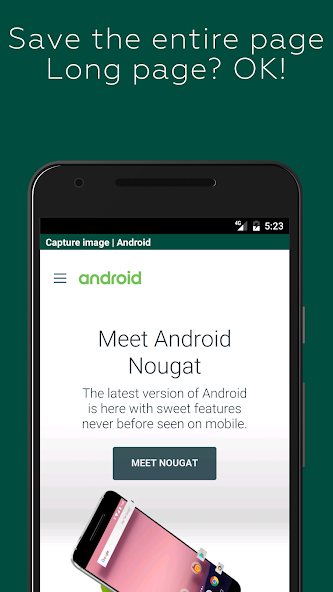
- You can save the entire page. It's also for long vertical pages!

- It blocks ads by default, so you can take ad-free captures (you can also turn off the blocking)

- You can also save only the area you are viewing.

- The image is saved as a PNG file, so there is no blurring.

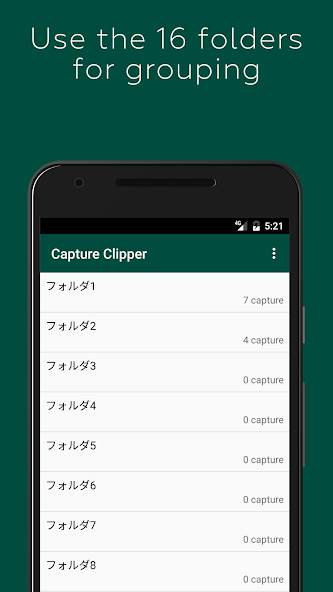
- The captures can be categorized into 16 folders. You can change the name of the folder as you like.

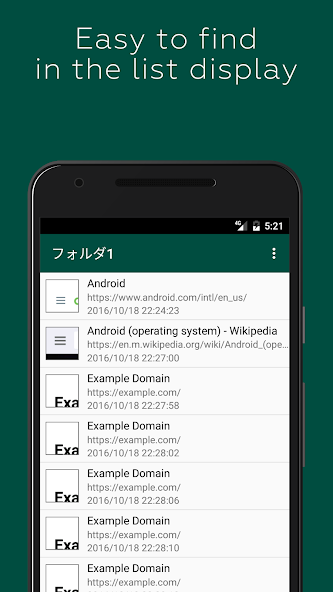
- Captures can also be viewed offline, saving you packet.

How to use it:

- Take note of coupons, transfer information, recipes, etc. and check offline!

- Save your favorite blogs and images that you want to see over and over again

Capture steps (for standard browser/Chrome):

1. display the Web site you want to capture in a standard browser/Chrome

2. display the Menu

3. select [Other].

4. select [Share Page].

Select [Capture Clipper].

You can use the same steps with other browsers.

Capture of the Login Required Page:

Due to technical limitations of Android, pages that require login, etc. cannot be captured directly. The preview screen can be used like a normal browser, so you can capture it with a login operation.

Also, if you select "Reload First Page" in the preview menu, the first URL that calls Capture Clipper will be reloaded. The recapture after the login process might come in handy just a little bit. (Reloading may not work in some cases.)

Restrictions: app capture:

Capture Clipper is for web pages only and cannot capture applications such as Facebook, email, games, etc.

You can capture them with Android 4.0 or later devices with the standard OS features. Try pressing the "Power" button and the "Volume Down" button at the same time.
What's New in the Latest Version 6.6.0

Last updated on Aug 24, 2024 Improved app reliability.
Download(4.94MB)
Users also viewed
  • Free Security VPN Private Pipe

    Free Security VPN Private Pipe

    1.0.18 March 1, 2026
  • Cherry blossom and Butterfly

    Cherry blossom and Butterfly

    1 March 1, 2026
  • Thermometer Mobile Temperature

    Thermometer Mobile Temperature

    1.21 March 1, 2026
  • Monogram Maker

    Monogram Maker

    1.4 March 1, 2026
  • Pink Stars Keyboard

    Pink Stars Keyboard

    1.279.1.107 February 28, 2026
  • Cau Noi Hay, Ghep Chu Vao Anh

    Cau Noi Hay, Ghep Chu Vao Anh

    1.2.0 February 28, 2026
  • Caller Name & SMS Speaker

    Caller Name & SMS Speaker

    4.3 February 28, 2026
  • Intrace

    Intrace

    3.0.11 February 27, 2026
  • Ensto Heat

    Ensto Heat

    1.6.1 February 27, 2026
  • Mosque Door Lock

    Mosque Door Lock

    1.1 February 26, 2026
  • RAM Booster Ultimate Pal

    RAM Booster Ultimate Pal

    v1.7 February 26, 2026
  • Stamp Meister

    Stamp Meister

    3.9 February 26, 2026
  • Parasaurolophus Trial

    Parasaurolophus Trial

    2.0.1 February 26, 2026
  • Photo Flower Frames

    Photo Flower Frames

    1.0.7 February 25, 2026
  • Blackboard Line Art Theme

    Blackboard Line Art Theme

    1.0 February 25, 2026
About Privacy Policy Terms of Service Cooking Policy

© Copyright 2017-2026 downzs.com