

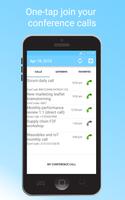
True one-touch conference calling
The smartest, quickest and easiest way to join conference calls (aka ATC, Audio Tele Conferencing, bridge calls or reservationless conferences in AT&T, Intercall) from your mobile device with a single touch of your screen. It’s a must have if you are working in a global environment and was already trusted by multiple top Fortune 500 companies.
Support for the most popular conference calling systems – webEx, Go2Meeting, Microsoft Lync, Microsoft Teams (added April 2020), Google Meet (added April 2020).
Please send me meeting invites that are not parsed correctly, I will try to make them work!
Conference Call Dialer is created by and for people who join multiple conference calls in a day, while traveling (like driving a car, using public transportation, on the airport, while jogging) or who are simply away from their computer, especially if your Internet connection is spotty (or not existing).
HOW IT WORKS:
1. Conference Call Dialer reads content of your Android calendar
2. All the events are parsed, phone numbers, conference codes, PINs and pass codes are automatically detected
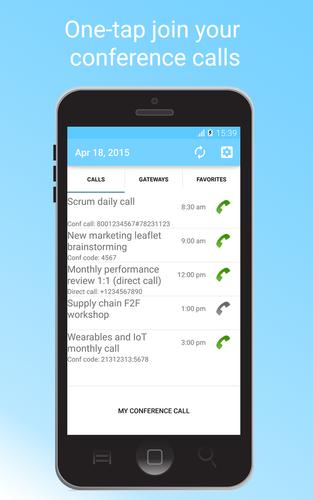
3. All the events are displayed in Conference Call Dialer in a nice daily overview
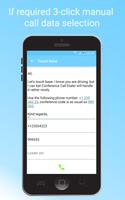
For meetings that cannot be parsed automatically you can use the 3-tap approach where after selecting event you tap on the items in the invite content and press the call button.
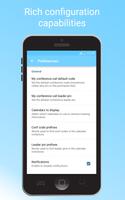
Conference Call Dialer allows also for reach configuration where you can define the standard prefixes that should be used to detect phone numbers, conference codes and leader pins. It also supports regular expressions (regex) for a complete freedom of data detection.
For more details about Conference Call Dialer see FAQ at http://bit.ly/conferencecalling
Conference calling has never being easier!
FEATURES:
• Retrieve information about meetings from your calendar (Gmail, Inbox and Outlook if it's synchronized into the google calendar)
• Dial into conference calls with conf code/participant code from the invitation - allows for selection if more than one conference code is found
• Support for multiple default gateway numbers and favorites conference calls (up to definition of custom DTMF code)
• Customization of waiting times, notification times, prefixes
• Widgets for the home screen for fast "My conference call" and "Join current meeting" actions
• Quickly join your own conference call from the app
• Automatic import of bridge numbers for selected companies
• Notifications before the meeting (Android Wear friendly)
Thanks to Conference Call Dialer you will never again need to write down the participant code or search for the invitation in your mail. Everything is available right at your fingertips. No need to create any external account (like with some other apps) or synchronize your calendar into external data store, Conference Call Dialer simply works the moment you download it to your device!
IMPORTANT
• If your device has a "privacy guard" functionality included (e.g. CM 10.1+ builds), don't forget to white-list Conf Call Dialer. Otherwise you'll see no calendars on the calendar selection list.
• Google Voice and Skype users - unfortunately neither Google Voice nor Skype handle pauses from external applications, so CCD will NOT be able to enter the conference code or leader pin if you are using Google Voice or Skype. Please provide feedback to Google and Microsoft that you are looking for that feature, maybe it will soften their hearts...
• Note that Conference Call Dialer is not meant to host conference calls directly on your phone. You require a 3rd party service to use it (like WebEx, Go2Meeting, Microsoft Lync, etc)
• Conference Call Dialer works with your device built-in calendars. If you are using 3rd party calendar applications (like Touchdown, IBM Lotus Notes or Samsung Knox) that don't expose their data as standard calendars, please sync their content with built-in google calendar.
Photos thanks to courtesy of Steve Wilson - https://www.flickr.com/photos/125303894@N06/




 Download