

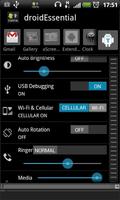
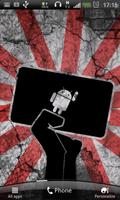
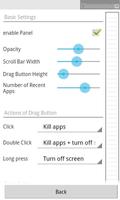
Toggles/Shortcuts; Brightness, Debuging, etc.taskManager, fullscreen, recentApp
* To solve things faster, please email me when problem occurred.
Feedbacks on Google play without further information won't help the debugging. Sorry for the incontinence. Regards.
■ ■ ■ ■ ■ ■ ■ ■ ■ ■ ■ ■ ■ ■ ■ ■ ■ ■ ■ ■ ■
Opens up a game or a video.
wow, the screen is so dark that I can barely see.
what can I do?
1. Press HOME key
2. Find my Setting iconu
3. Go to Display
4. Select Brightness
5. Adjust the brigntness
6. Open up Recent-App-List
7. Go back to the game or the video.
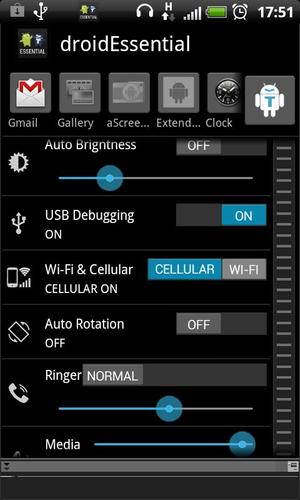
With droidEssential installed, simply swipe down the panel, adjust the brightness on the fly.
-- Other Toggles --
My Apps
Brightness
USB Debuging
Wi-Fi / Cellular Network
Auto Rotation
Ringer / Media / Alarm
Go to Setting (shortcut)
need more? tell me!
ps: The icon on each Toggle also works as a shortcut
-- Other functionalities --
Recent Apps
switch between apps
is-app-currently-running-indication
app kill (swipe down from the icon)
Terminator button
Single Click: Kill all the apps
Double Click: Kill all the apps + Turn off screen
Long Press: Turn off screen
Fullscreen Status Bar Enabler
bring down the Status Bar during fullscreen state
-- For detail --
https://hiro4476.appspot.com/droid_essential_faq
-- Power consumption --
Nothing's happening when there's no user interaction. So, not much, I assume.
-- Some of the function might needs a root access --
I have a root phone, it's hard to know what's not working.
Please inform me if you've got a non-root phone and something's not working for you. I'd love to put that info in the description as well as in the app :)
-- Future Update --
* NFC ability
* Youtube (video) support
-- Device tested --
HTC Desire HD : 2.3.4 Gingerbread
HTC Desire HD : 4.0.4 ICS
□ new Toggle and Shortcut
"My Apps" shortcut
"Smart ADB" toggle
use "Try it out!" button to check'em out!
□ The very same "My Apps" list can also be brought up by "Drag Button's actions"
Open your favorite apps anywhere anytime!
□ Fullscreen Status Bar Enabler's width setting
1.8.3
minor bug fix.



 Download