


ECOVACS APP allows you to control your ECOVACS products while at home or away
ECOVACS debuts! With awesome connected features, our latest App allows you to control your DEEBOT anytime, anywhere, and takes your cleaning experience to a new level.
Please check your DEEBOT model before downloading.
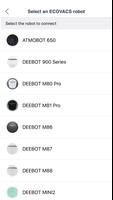
ECOVACS App now supports:
• ATMOBOT 650
• DEEBOT 900 Series (DEEBOT 900/901/907)
• DEEBOT M80 Pro
• DEEBOT M81 Pro
• DEEBOT M86
• DEEBOT M87
• DEEBOT M88
• DEEBOT Mini2
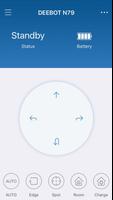
• DEEBOT N79
• DEEBOT N79 S/SE/T/W
• DEEBOT OZMO 600
• DEEBOT OZMO 601
• DEEBOT OZMO 610 Series (DEEBOT OZMO 610/615)
• DEEBOT OZMO 930 Series (DEEBOT OZMO 930/937)
• DEEBOT PRO 930
• DEEBOT R95
• DEEBOT R96
• DEEBOT R98
• DEEBOT Slim 2 Series (DEEBOT Slim 2/2 Marvel/Neo)
For Wi-Fi enabled models that are not on the list, please download the ECOVACS HOME App.
By connecting to your DEEBOT, you can:
• Start, pause, or stop cleaning
• Set a regular cleaning schedule
• Set voice report, suction power, and Do-Not-Disturb time*
• Receive notifications from your Wi-Fi enabled robot
• Share DEEBOT with your friends through multiple accounts*
• Receive software and firmware updates
• Access instruction manuals, video tutorials and FAQs, and contact customer service*
And you can do much more with your advanced mapping DEEBOT (powered by Smart Navi™ Technology):
• Set up Virtual Boundary™ to create no-go zones*
• Use Custom Cleaning to customize any cleaning area you want*
• View real-time stats from the visual map of your home, areas cleaned, and cleaning time*
• Adjust water flow level when DEEBOT is mopping (Robots with mopping function only)*
*Features vary with models. Go to ECOVACS.com to see detailed features of your model.
Plus, you can control your DEEBOT with simple commands through Amazon Alexa and Google Home**.
**Smart Home commands are available only in some countries/regions.
Requirements:
Wi-Fi with 2.4 GHz band support only
Mobile device with Android 4.0 or later
Need help? Visit ECOVACS.com for more information or to contact our customer service team.





 Download