

Powerful and full-featured organizer.
This is an Android version of highly popular on Windows platform organizer - EssentialPIM. It allows you to manage Calendars, Tasks, Notes, Contacts and Passwords. All your data is interconnected and in one package!
- Synchronize all your data
Syncs with Windows version of EssentialPIM. Synchronization with Google Calendar, Google Tasks, Google Drive (for Notes and Passwords) and Google Contacts is also available.
- Powerful calendar views
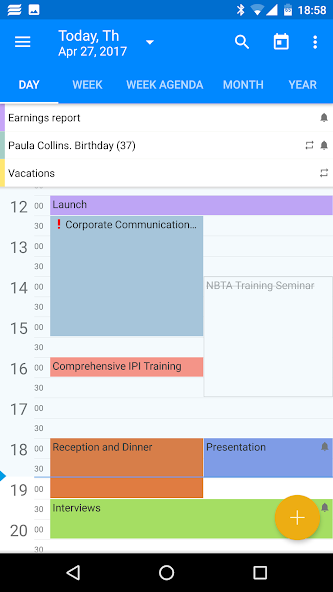
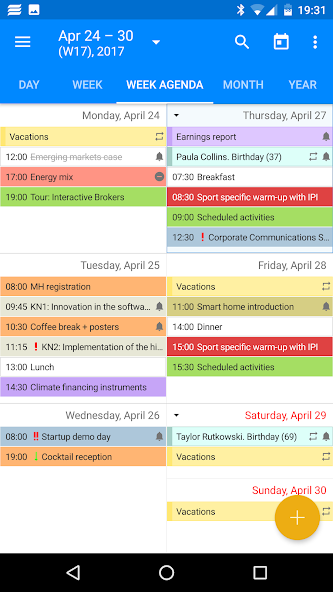
Colourful, easy-to-read day, week, week agenda, month, year and agenda views.
- Hierarchical tasks structure
Flexible structure that organizes tasks into multiple trees, with sub trees and leaves.
- Tree-like multilevel notes structure
Multiple views allow quick notes preview, management and location of data.
- Conveniently organized contacts
Wide selection of fields and unlimited number of contact groups that can be organized hierarchically.
- Secure passwords list
Self-locking mechanism offers safe and convenient way to store all your passwords and other sensitive data.
- Beautiful and functional widgets (some available through in-app purchase)
Make use of Calendar (agenda and month views), Tasks, Notes and quick add new EPIM items widgets. Place shortcuts for EPIM modules on the home screen for quicker access.
- Organize your data with tags
Create as many tags as you wish and assign them to any items within the app to better organize your information flow.
- Attach files to items
You can now store any external files attached to items (appointments, notes, tasks, etc.) you need to keep handy.
- Password protect the whole app
Keep your personal information safe and secure, lock it down with a password and/or your fingerprint. Data is encrypted with a random 256-bit AES key.
- Data backup and restore
Backup EssentialPIM data to your device or to any online service. Restore the backup data with ease onto the existing or any other Android device.
Key features:
- Includes Calendar (day, week, week agenda, month, year and agenda views), Tasks (custom fields, hierarchical structure), Notes (tree-like multilevel structure), Contacts (groups and unlimited custom fields) and Passwords (secure, self-locking mechanism) modules
- Customizable widgets (calendar month and agenda views, tasks, notes, quick add new items, modules shortcuts)
- Flawless synchronization with Win EPIM works as via EPIM Cloud as directly over Wi-Fi, cellular networks (4G/LTE), Bluetooth or USB cable
- Automatic synchronization of all your data with Google services: Calendar, Tasks, Drive (for Notes and Passwords) and Contacts
- Ability to assign tags to items, which is always a great way to better organize your data and its usage scenarios
- Storing attachments linked to any types of items
- Lock the app with a password and/or fingerprint for security purposes
- Data backup/restore option
- Fast and responsive user interface with light and dark themes
- Ads free
EssentialPIM Pro (paid version) exclusive features:
- Beautiful Calendar (Agenda and Month views), Tasks and Notes widgets
- Ability to show Tasks in Calendar
- Lock time zone setting for Calendar (allows users to lock their events at a time zone they were created in)
- Automatic upload of backups to Google Drive
- Password protect the whole app
Support and feedback:
If you are looking for help or have any questions or ideas, please contact us by tapping on the Send feedback link in Settings->About or using the following email address: [email protected].
About translation:
Seeing EssentialPIM not being fully translated into your language? We would like to invite you to take part in the translation process. It’s easy and fun. And if you aren’t ready to do translation just yet, you can still review the existing one for mistakes. Please contact us at [email protected] and we will reply back with an invite.
As a token of appreciation, all active contributors get free EssentialPIM Pro Android and Windows version licenses.



![[FREE]AppRunTimeChecker](https://images.downzs.com/uploads/20260906/logo_6a9d577d937051.jpg)






 Download