

• Home
  • Game
    Action Simulation RPG Sports Casual Cards Music Puzzle Shooting Romance
  • Apps
    Business Social Lifestyle Shopping Tools Travel Finance Education News Health
  • Articles

English 中文(简体) 中文(繁体) 한국어 日本語 Português Español Русский العربية Indonesia Deutsch Français ภาษาไทย
Home Apps Tools Fab Collage & Photo Editor
Fab Collage & Photo Editor

Fab Collage & Photo Editor

1
2
3
4
5
Download
  • Version 3.0
  • Category Tools
  • Package Name com.velan.android.picstitchcollage
  • Update Time November 21, 2025
  • Size 6.79MB
About this app

Pic Grid - Collage Creation Made Simple

**** More than 13 Million Downloads ***

Pic Grid Collage Maker for Instagram

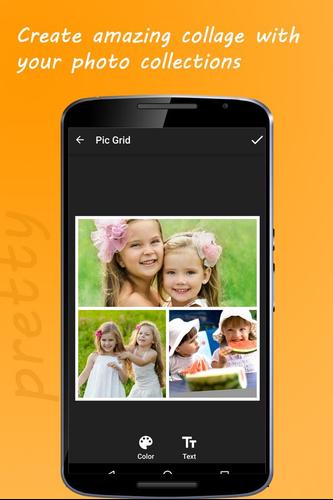
An easy to use application which enables you to stitch collage with your wonderful photos. Integrated with powerful picture editor and more than 50 layout in different aspect ratios (1:1 for square collage, 4:3, 3:4, 3:2), you can be super creative in creating collages. Pic Grid Collage maker is packed with multiple fonts you can choose to create personal text messages/quotes over the collage.

Join over 13 millions of people who use Pic Grid Collage Maker app to stitch photos, quotes, stickers, backgrounds to make the awesome collage, they wish.

Popular Features of Pic Grid Collage Maker:

1. Choose layout grid instantly.

2. Dozens of popular photo filter effects;

3. Edit Photos and Crop them in the way you wish.

4. Text editor with support of different fonts and colours.

5. Plenty of stickers and pattern to choose.

6. Customize photo borders, like adjust the border thickness, add color or pattern to the border.

7. High Resolution Output.

How to use?

1. Select Pic Grid and aspect ratio (1:1, 4:3, 3:4, 3:2). More than 50 layouts and they are organised based on the number of photographs that you wish to collage.


2. Tap to add picture from Gallery and the picture will be directly opened in Photo Editor. After making necessary editing, please select done and the photos will appear on the grid.


3. You can resize, rotate, move the photos inside the grid.


4. Add Background colour with Colour picker tool.


5. Add Background pattern.


6. Add Various stickers to the collage.


7. Save the collage and share it with the world through Instagram, Facebook, Twitter and other social networks.

What's New in the Latest Version 3.0

Last updated on Feb 16, 2020 1. Elegant User Interface
2.Multiple new grids added
3.Multiple new icons added
4.User reported Crash issues resolved
Download(6.79MB)
Users also viewed
  • Luxury Picture Frames Editor

    Luxury Picture Frames Editor

    1.12 December 1, 2025
  • Dinosaur Hunting Games 2021

    Dinosaur Hunting Games 2021

    1.0.10 December 1, 2025
  • CAMIP

    CAMIP

    1.8 November 30, 2025
  • Galaxy Theme GO Weather EX

    Galaxy Theme GO Weather EX

    1.4 November 30, 2025
  • Koi fish pond II

    Koi fish pond II

    1.7 November 30, 2025
  • Wifi Radar

    Wifi Radar

    5.07 November 29, 2025
  • Retro Icon Pack

    Retro Icon Pack

    1.0.1 November 29, 2025
  • MIUI v4 kakaotalk theme

    MIUI v4 kakaotalk theme

    1.0.1 November 28, 2025
  • Pink Glow Keyboard Theme

    Pink Glow Keyboard Theme

    1.279.1.93 November 28, 2025
  • Modular Kitchen

    Modular Kitchen

    1.0 November 28, 2025
  • Baby Cat, Cute Live Wallpaper

    Baby Cat, Cute Live Wallpaper

    2.0.1 November 28, 2025
  • Private QR

    Private QR

    1.1.7 November 27, 2025
  • Brick&Bolt Professionals

    Brick&Bolt Professionals

    4.4.5 November 27, 2025
  • APW Theme Modern ICS

    APW Theme Modern ICS

    1.2 November 27, 2025
  • Intellicast Weather

    Intellicast Weather

    1.3.5 November 27, 2025
About Privacy Policy Terms of Service Cooking Policy

© Copyright 2017-2025 downzs.com