

Swarachakra is a logically ordered keyboard, found to be easy to use for newbies
સત્ય યશનું મૂળ છે.સત્ય વિશ્વાસનું કારણ છે.સત્ય સ્વર્ગનું દ્વાર છે.સત્ય જ સિદ્ધિનું સોપાન છે.-મોહનદાસ કરમચંદ ગાંધી .If your device can display this sentence in Gujarati perfectly, then your device supports Gujarati and Swarachakra should also work well. If you do not see any text, or if some of the words are incorrect, Swarachakra may not work well.
Swarachakra Gujarati ( સ્વરચક્ર ગુજરાતી ) is a touch-screen keyboard for inputting text in Gujarati. (Swarachakra is also available in Hindi, Marathi, Telugu, Kannada, Malayalam, Odia, Punjabi, Bengali, Konkani and Tamil).
Swarachakra uses a logically ordered design based on the structure of Gujarati script. Swarachakra displays the consonants sequenced according to the logical structure of script, phonetically grouped and arranged in a grid similar to those found in most school textbooks.
Typing with Swarachakra
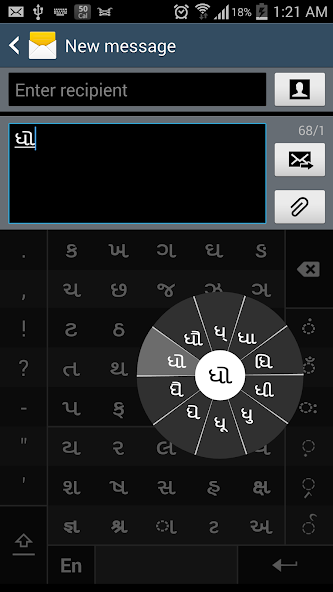
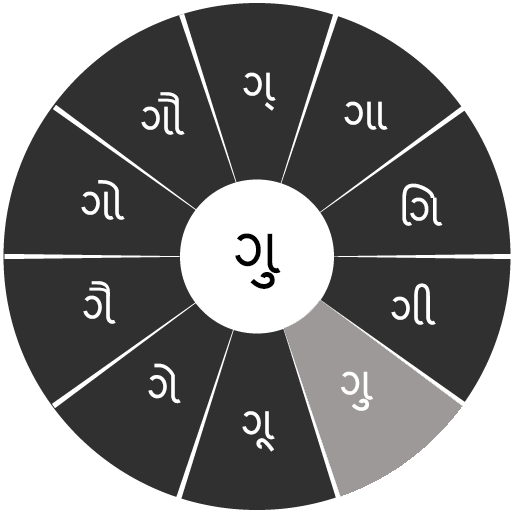
In Gujarati, we frequently need to type a combination of a consonant ( ધ ) and a matra ( ો ) like ધ + ો = ધો . When you touch a consonant, a chakra with combination of consonants and 10 frequent matras pops up ( ધા,ધી,ધિ,ધુ,ધૂ,ધે,ધૈ,ધો,... ). The chakra gives a preview of the possible character combinations. To select a combination, you slide the stylus or finger towards it.
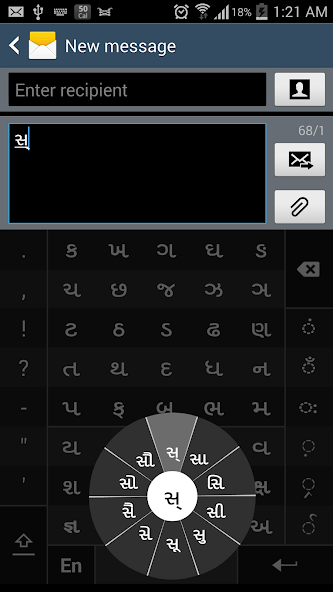
Typing conjuncts like ક્રિ, સ્થ, લ્ય is particularly hard for most people. Swarachakra makes it easy. First tap on the first part of the combination and select the halant from the chakra ( સ + ્ ).
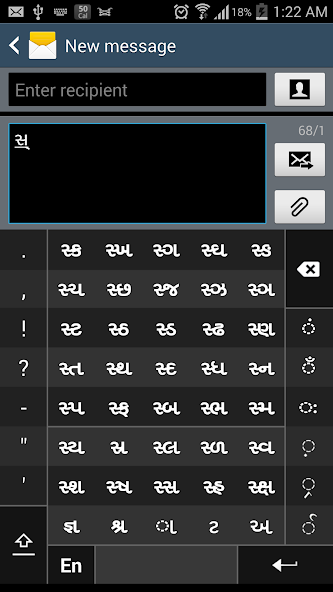
Swarachakra then shows a preview of all possible conjuncts that begin with that consonant ( સ + ્ + ત = સ્ત ; સ + ્ + થ = સ્થ etc.). If you need to add a matra, select it from the new chakra like earlier ( સ્થા,સ્થિ,સ્થી,સ્થુ,સ્થૂ... ).
To type a rafar ( ર્થ ), a rashtrachinha ( ટ્ર ), first select the corresponding key from the right-most bottom keys, and then type as usual.
Complete vowels ( અ, આ, ઇ, ઈ, ઉ, ઊ, એ, ઐ, ઓ, ઔ ) appear in a separate chakra on the bottom right. The less used vowels and matras are next to it ( ઽ, ઑ, ૃ, ઋ, ૄ, ૠ, ત્ર ,ૅ ,ૉ ). Numerals, symbols and rarely used characters appear on a shift. You could also switch to the QWERTY keypad temporarily to input English characters.
Installing Swarachakra
First, install Swarachakra Gujarati by clicking the “Install” button above.
Next, you need to “enable” the keyboard. To enable, open “Settings”, select “Language and Input” and check the box in front of સ્વરચક્ર ગુજરતી (Swarachakra Gujarati) in the “Keyboard and input methods” section.
Finally, click on the “Default” option in the “Keyboard and input methods” section, and select સ્વરચક્ર ગુજરતી (Swarachakra Gujarati) as the default keyboard. (Sorry, but that's how Android works)
NOTE: Swarachakra is designed for Android 4.0 (ICS) onwards. It does not work right now on older versions because they do not have Unicode support.




 unduh
unduh