• Home
  • Game
    Action Simulation RPG Sports Casual Cards Music Puzzle Shooting Romance
  • Apps
    Business Social Lifestyle Shopping Tools Travel Finance Education News Health
  • Articles

English 中文(简体) 中文(繁体) 한국어 日本語 Português Español Русский العربية Indonesia Deutsch Français ภาษาไทย
Home Apps Tools LevitationCamTrial
LevitationCamTrial

LevitationCamTrial

1
2
3
4
5
Download
  • Version 1.6
  • Category Tools
  • Package Name com.fourcubes.levitationcam
  • Update Time September 6, 2025
  • Size 3.25MB
About this app

Clone photography

*****************************************************************

IF YOU WANT

> Front camera support

> Multi layer levitation

> Drama Shot

> Clone photography

> Advanced image retouch

go with DRAMA SHOT....

*****************************************************************

********************************IMPORTANT********************************************

PLEASE ALWAYS USE LEVITATIONCAM WITH A MOBILE STAND...

ALSO WATCH THE VIDEO FOR INSTRUCTIONS

********************************************************************************************

LevitationCam makes levitation photography possible for anyone with an android phone.

No SLR camera, No Tripods, No triggers, No photoshop.

It takes just three simple steps to create your levitation images.

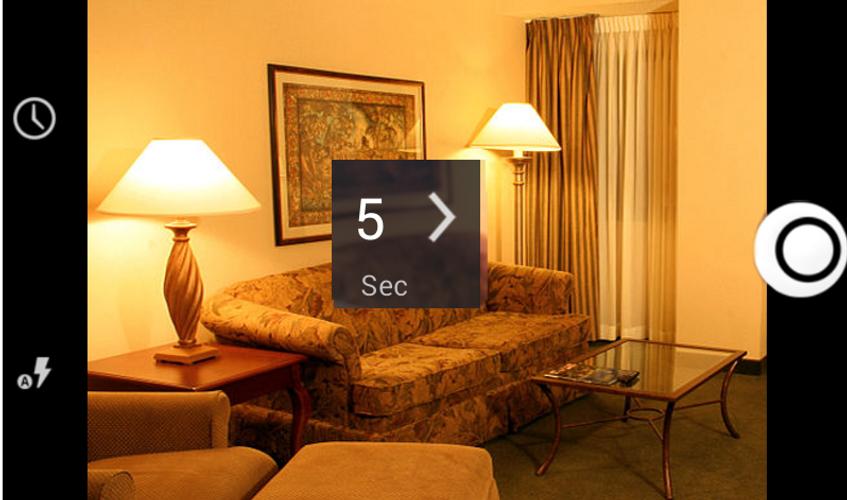
1) Select timer interval between 5 sec to 90 sec. Place the camera on a stand and press capture button.

After 5 sec interval the first shot is taken which is the background image( without subject) .

2) Now place your subject according to your wish on the chair, carton or anything which you have chosen for your subject's support. After the selected timer interval a shot is automatically taken.

3) Now LevitationCam takes you to the edit mode. You can see two images as thumbnails, at bottom of the screen. First is the background image. Second is the image with the subject. Select image 1 from thumbnail. Select brush and erase the object that was used to support your model. If you accidentally erased more , then select image 2 and do a retouch. Adjust brush size and opacity based on your need.

That is it.. Save it .. Share it and see your friend drop their jaws.

Now defy gravity, float in thin air :-)

Note:

Does not work with some models of LG phone
What's New in the Latest Version 1.6

Last updated on Aug 17, 2015 Image save support
Fixed some bugs
Fixed screen timeout issue.
Updated erase mode
Download(3.25MB)
Users also viewed
  • easy SD video player

    easy SD video player

    20200623 March 2, 2026
  • Camera Magic

    Camera Magic

    5.1 March 2, 2026
  • Poster Banner Ads Maker

    Poster Banner Ads Maker

    1.9 March 2, 2026
  • SL Theme Jeans

    SL Theme Jeans

    1.0 March 2, 2026
  • Free Security VPN Private Pipe

    Free Security VPN Private Pipe

    1.0.18 March 1, 2026
  • Cherry blossom and Butterfly

    Cherry blossom and Butterfly

    1 March 1, 2026
  • Thermometer Mobile Temperature

    Thermometer Mobile Temperature

    1.21 March 1, 2026
  • Monogram Maker

    Monogram Maker

    1.4 March 1, 2026
  • Pink Stars Keyboard

    Pink Stars Keyboard

    1.279.1.107 February 28, 2026
  • Cau Noi Hay, Ghep Chu Vao Anh

    Cau Noi Hay, Ghep Chu Vao Anh

    1.2.0 February 28, 2026
  • Caller Name & SMS Speaker

    Caller Name & SMS Speaker

    4.3 February 28, 2026
  • Intrace

    Intrace

    3.0.11 February 27, 2026
  • Ensto Heat

    Ensto Heat

    1.6.1 February 27, 2026
  • Mosque Door Lock

    Mosque Door Lock

    1.1 February 26, 2026
  • RAM Booster Ultimate Pal

    RAM Booster Ultimate Pal

    v1.7 February 26, 2026
About Privacy Policy Terms of Service Cooking Policy

© Copyright 2017-2026 downzs.com