• Home
  • Game
    Action Simulation RPG Sports Casual Cards Music Puzzle Shooting Romance
  • Apps
    Business Social Lifestyle Shopping Tools Travel Finance Education News Health
  • Articles

English 中文(简体) 中文(繁体) 한국어 日本語 Português Español Русский العربية Indonesia Deutsch Français ภาษาไทย
Home Apps Tools LUMIX LINK
LUMIX LINK

LUMIX LINK

1
2
3
4
5
Download
  • Version 2.1.22
  • Category Tools
  • Package Name jp.co.panasonic.lumix_link.activity
  • Update Time June 14, 2025
  • Size 3.39MB
About this app

Enjoy millions of the latest Android apps, games, music, movies, TV, books, magazines & more. Anytime, anywhere, across your devices.

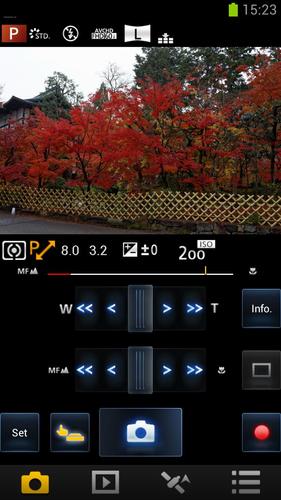
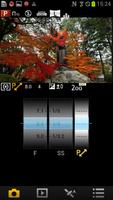
“LUMIX LINK” is an application that makes it possible to use your smartphone to remotely control the shooting and playback functions of a LUMIX digital camera equipped with wireless communication functions and perform upload operations to SNS sites.

The following functions are available in this application.

(Compatible models are listed in parentheses.)

・ A function that allows you to see the same image as that on the camera’s Live View screen during shooting (FX90, SZ5, GH3)

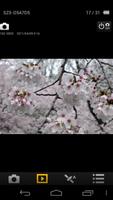
・ Functions for transferring recorded pictures from the camera to your smartphone, and for uploading them to SNS sites (FX90, SZ5, GH3)

・ Functions for playing back or deleting recorded pictures in the camera from your smartphone, copying them to your smartphone, and uploading them to SNS sites (SZ5, GH3)

・ A function for recording location data using GPS (SZ5, GH3)

・ A function for adding location data obtained using your smartphone to pictures in the camera (SZ5, GH3)

・ Functions for sending and receiving pictures using the LUMIX CLUB Cloud Sync. Service (SZ5, GH3)

[Notes]

・ Continued use of GPS running in the background can dramatically decrease battery life.

・ In order to use the Cloud Sync. Service, you must first obtain a service user ID for Panasonic’s service LUMIX CLUB (free of charge).

This application is compatible with smartphones with the following OS versions.

Android OS 2.2 – 4.2
What's New in the Latest Version 2.1.22

Last updated on Aug 3, 2015 1920 x 1080, 60p[NTSC]/50p[PAL], 28Mbps mode is added in the video recording option of [MP4].
Download(3.39MB)
Users also viewed
  • BK SoftHome

    BK SoftHome

    1.0 April 19, 2026
  • Wallpaper Cars Nitro

    Wallpaper Cars Nitro

    4.0 April 19, 2026
  • Neon Painting

    Neon Painting

    1.0.7 April 19, 2026
  • AlertaBlu

    AlertaBlu

    100.14 April 19, 2026
  • dogeweather

    dogeweather

    1.3 April 19, 2026
  • Live Weather: Clock and Widget

    Live Weather: Clock and Widget

    1.0 April 19, 2026
  • JuiceDefender beta

    JuiceDefender beta

    3.9.4beta April 19, 2026
  • DiffTool

    DiffTool

    2.08 April 19, 2026
  • Glass Chips Locker Theme

    Glass Chips Locker Theme

    1.200.1.74 April 18, 2026
  • Live Air

    Live Air

    3.1 April 18, 2026
  • Pimp my Band

    Pimp my Band

    1.2 April 17, 2026
  • Arachnophobia Free LW

    Arachnophobia Free LW

    1.18 April 17, 2026
  • 3d Car Tuner

    3d Car Tuner

    1.32 April 17, 2026
  • Remote for air conditioner (AC

    Remote for air conditioner (AC

    991.0 April 16, 2026
  • Super Battery Saver

    Super Battery Saver

    1.0 April 16, 2026
About Privacy Policy Terms of Service Cooking Policy

© Copyright 2017-2026 downzs.com