• Home
  • Game
    Action Simulation RPG Sports Casual Cards Music Puzzle Shooting Romance
  • Apps
    Business Social Lifestyle Shopping Tools Travel Finance Education News Health
  • Articles

English 中文(简体) 中文(繁体) 한국어 日本語 Português Español Русский العربية Indonesia Deutsch Français ภาษาไทย
Home Apps Lifestyle Panasonic Blu-ray Remote 2012
Panasonic Blu-ray Remote 2012

Panasonic Blu-ray Remote 2012

1
2
3
4
5
Download
  • Version 1.0.1
  • Category Lifestyle
  • Package Name com.panasonic.avc.diga.blurayremote2012
  • Update Time March 16, 2026
  • Size 3.6MB
About this app

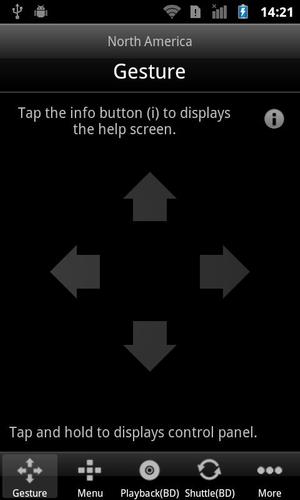
Blu-ray Remote 2012 can control Panasonic BD Player over Wi-Fi network.

Panasonic Blu-ray Remote 2012 brings you to the next stage of operation experience at your fingertips. Control Panasonic Blu-ray Disc™ Player DMP-BDT120, DMP-BDT220, DMP-BDT221, DMP-BDT320, DMP-BDT500 and DMP-BBT01 using your Android device over your Wi-Fi network. Playback a Blu-ray Disc™, choose your favorite language, and even select a chapter where you want to start all done by familiar Android device interface. Moreover, you can control to play music, photos or videos from your personal computers or network attached storage over DLNA, or play VIERA CAST contents from anywhere in your home. With a flick or tap of your finger(s), functions on IR remote are ready to serve.

Features:

- Control Panasonic Blu-ray Disc™ Player DMP-BDT120, DMP-BDT220, DMP-BDT221, DMP-BDT320, DMP-BDT500 and DMP-BBT01, from your Android device from anywhere in your home

- Turn power on/off, call home screen, call OPTION menu functions and return

- Launch VIERA Connect, Netflix and Skype directly. Enjoy playing games of VIERA Connect with game pad mode. Input search text by keyboard mode and search favorite moive on YouTube.

- Play, pause, stop, fast-forward, rewind, slow, slow-back, skip, skip back, choose languages, choose subtitles, emulate jog/shuttle dial, and scrubbing

- Switch picture-in-picture on/off, switch secondary audio, call display OSD menu, call status and display

- Up, down, left and right by cursor, and 10 keys

For information on using this app, compatible models and feature or any trouble about this app, please visit the following support page.

http://panasonic.jp/support/global/cs/bd/bremote/2012/android/index.html

Please understand that we will not be able to contact you directly even if you use the “Email Developer” link.
What's New in the Latest Version 1.0.1

Last updated on Sep 18, 2015 Improved the performance of device detection.
Download(3.6MB)
Users also viewed
  • Impressionism HD

    Impressionism HD

    1.3 March 15, 2026
  • WeOn Glasses

    WeOn Glasses

    1.1 March 15, 2026
  • Fifty Shades

    Fifty Shades

    1.3.4.1 March 15, 2026
  • Harvey Norman NZ Photocentre

    Harvey Norman NZ Photocentre

    18.11.71 March 14, 2026
  • XBSlink Remote

    XBSlink Remote

    1.0 March 14, 2026
  • Sex Offender Registry Search

    Sex Offender Registry Search

    1.2 March 13, 2026
  • L'illa Diagonal Barcelona

    L'illa Diagonal Barcelona

    11.2.2 March 13, 2026
  • Automotive Aftermarket

    Automotive Aftermarket

    0.0.10 March 12, 2026
  • Poemas de Amistad

    Poemas de Amistad

    1.9 March 12, 2026
  • Kannada Horoscope: Daily Rashi

    Kannada Horoscope: Daily Rashi

    1.3 March 12, 2026
  • BCY20

    BCY20

    4.0 March 12, 2026
  • Cachebox

    Cachebox

    20240511REL March 11, 2026
  • Beamore

    Beamore

    1.0 March 11, 2026
  • Sabias que

    Sabias que

    1.0.2 March 10, 2026
  • Muslim -Quran,Ramadan,Azan

    Muslim -Quran,Ramadan,Azan

    1.0.0 March 10, 2026
About Privacy Policy Terms of Service Cooking Policy

© Copyright 2017-2026 downzs.com