

This is a keyboard that support typing Sinhala Unicode in English.
This is a keyboard that support typing in Sinhalese in English. You must have Unicode support to type in Sinhala. I haven't tested the App in all the devices available in the market. So this may not work in your device. Just download and try it. It's free. If doesn't work in your device please be kind enough to email me rather than adding 1 star rating.
Rating & Review
-------
When you rate any App less than 5 stars, as a responsible person please leave few words explaining why.
NOTE: This is a trial version only. This shows all the images of the full version and has all the features of the Keyboard except this shows a license popup after every 10 letters.
Features
-----
Has 3 main interfaces
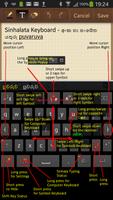
-- 1st interface ( the default) - has most of the letters and symbols you often use.
Top row has 3 symbols. There are 3 ways to select from these 3 symbol keys
1. Tap once to get the first symbol, tap twice to get the middle symbol and 3 times to get the third symbol.
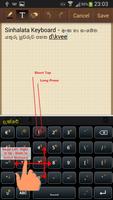
2. Long press to bring up a popup and tap on the required symbol.
3. Swipe left to get to get the first symbol, swipe up to get the middle symbol and swipe right to get the 3rd symbol.
A long press on letters would give you the opposite case letter. Long press on "a" would give you "A" while a long press on "A" would give you "a". The long press time is indicated by a short vibration. Also swiping up on a letter key would give the opposite case.
A long press on "." ( dot ) would bring up the often used domain extensions.
A long press on a key with orange colored super scripted symbol would give you the orange colored symbol. But the key with symbol "12$" would bring up the computer keyboard like keypad.
Left and right arrow keys are to navigate between letters you just typed.
-- 2nd Interface Symbols Keypad
Tap on "12$" key or swipe on the screen from left to right or right to left to get to this interface. I always had problems typing telephone numbers using one hand as the numbers are far apart in most of the keyboards.
-- 3rd Interface Computer Keyboard
This interface is very useful with passwords specially if you are using complex passwords. Long press "12$" key to bring up this keypad. I couldn't fine one keyboard which I could easily switch between compact keypad and computer like keypad.
-----
To add a new word to the list type in the word and tap on the yellow composed text.
When you are in the default interface you can long press "12$" key to bring up the computer key interface.
To change the interface you can use "12$"/ "ABC" button or swipe left or right.
The letter formation is based on the Sinhalata (http://www.sinhalata.com) software.
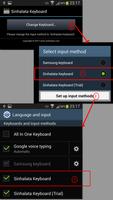
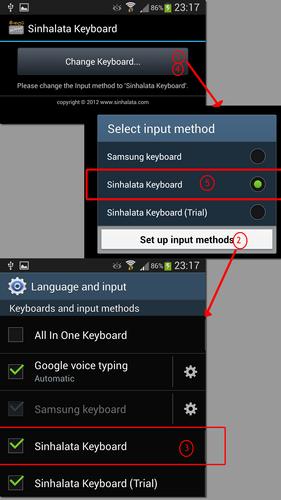
Changing to Sinhalata Keyboard
------
Goto
Settings > Language and Input > Tick Sinhalata Keyboard (Trial)
Then Change
Default to:
Sinhalata Keyboard (Trial)
------
DISCLAIMER: TO THE EXTENT ALLOWED BY LOCAL LAW, THIS SOFTWARE IS PROVIDED TO YOU "AS IS" WITHOUT WARRANTIES OR CONDITIONS OF ANY KIND, WHETHER ORAL OR WRITTEN, EXPRESS OR IMPLIED. THE AUTHOR SPECIFICALLY DISCLAIMS ANY IMPLIED WARRANTIES OR CONDITIONS OF MERCHANTABILITY, SATISFACTORY QUALITY, NON-INFRINGEMENT AND FITNESS FOR A PARTICULAR PURPOSE.
LIMITATION OF LIABILITY: EXCEPT TO THE EXTENT PROHIBITED BY LOCAL LAW, IN NO EVENT WILL AUTHOR OR SUPPLIERS BE LIABLE FOR DIRECT, SPECIAL, INCIDENTAL, CONSEQUENTIAL OR OTHER DAMAGES (INCLUDING LOST PROFIT, LOST DATA, OR MALFUNCTION OF DEVICE), ARISING OUT OF THE USE, INABILITY TO USE, OR THE RESULTS OF USE OF THE SOFTWARE, WHETHER BASED IN WARRANTY, CONTRACT, TORT OR OTHER LEGAL THEORY, AND WHETHER OR NOT ADVISED OF THE POSSIBILITY OF SUCH DAMAGES.
COPYRIGHT: This program is protected by copyright law and international treaties. Unauthorized distribution of this program or any portion of it may result in severe civil and criminal penalties and will be prosecuted to the maximum extent possible under the law. However you are free to reproduce a similar program and use it's concept without authors consent.




 Download