

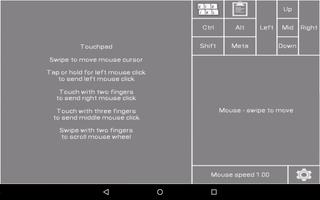
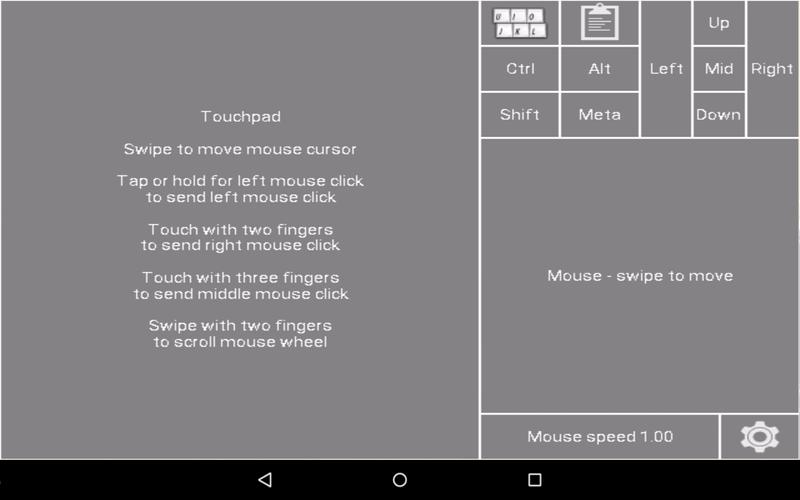
Turn your Android device into USB Keyboard/mouse for your PC
Turn your Android device into USB Keyboard/mouse for your PC.
You will need to install custom kernel to your Android device, that will add keyboard+mouse functions to it's USB port, this app is used to send key and mouse events. You will also need root.
No driver installation is needed for your PC.
It will work inside BIOS, inside bootloader, with any OS, and with any hardware that has USB socket - PC, Mac, Xbox, Chromebook, even other Android devices through USB Host adapter.
Supported devices:
Nexus 7 2012 WiFi - flash kernel inside this app
If your Nexus 7 is not rooted - follow installation instructions here: https://github.com/pelya/android-keyboard-gadget
Nexus 7 2013 - http://forum.xda-developers.com/showthread.php?t=2809979
LG G2 - http://forum.xda-developers.com/showthread.php?t=2725023
LG G2 with Cyanogenmod 12.0: https://github.com/pelya/android-keyboard-gadget/tree/master/lg-g2
Nexus 5 - http://forum.xda-developers.com/showthread.php?t=2551441 or http://forum.xda-developers.com/showthread.php?t=2527130 or https://github.com/pelya/android-keyboard-gadget/tree/master/nexus5-hammerhead-android-5.0
Nexus 4 - http://forum.xda-developers.com/showthread.php?t=2548872 or http://forum.xda-developers.com/showthread.php?t=2858561
Sony Ericsson phones - http://legacyxperia.github.io/
Moto G: http://forum.xda-developers.com/showthread.php?t=2634745 or http://forum.xda-developers.com/showthread.php?t=2786336
Moto E: http://forum.xda-developers.com/showthread.php?t=2931985
Moto G 2014: http://forum.xda-developers.com/showthread.php?t=3085277
Moto G4 Play: https://github.com/pelya/android-keyboard-gadget/tree/master/motorola-G4-Play
Moto X Style (Pure) 2015: http://forum.xda-developers.com/showthread.php?t=3554226
OnePlus One: http://sourceforge.net/projects/namelessrom/files/bacon/
Galaxy S4: http://forum.xda-developers.com/showthread.php?t=2590246 - you have to enable it in the included STweaks app
Galaxy Note 2: http://forum.xda-developers.com/showthread.php?t=2231374
Ideos X5: http://forum.xda-developers.com/showthread.php?t=2616956
Xperia Z3 and Z3 Compact: http://forum.xda-developers.com/showthread.php?t=2937173
Xperia Z Ultra: http://forum.xda-developers.com/showthread.php?t=3066748
Redmi 1S: http://forum.xda-developers.com/showthread.php?t=2998620
Redmi 3S: http://forum.xda-developers.com/showthread.php?t=3667804
Galaxy Ace 2: http://forum.xda-developers.com/showthread.php?t=2793420
Xiaomi MI3: http://forum.xda-developers.com/showthread.php?t=3093399
Galaxy Note 4: http://www.echoerom.com/ael-kernels/
Zenfone 2 ZE551ML: https://github.com/pelya/android-keyboard-gadget/blob/master/asus-Zenfone-2-ZE551ML/boot.img?raw=true
Xperia Z5 Premium E6853: https://github.com/pelya/android-keyboard-gadget/blob/master/sony-xperia-z5p/boot.img?raw=true
Xperia Z5 Compact: https://github.com/pelya/android-keyboard-gadget/blob/master/sony-z5c/boot.img?raw=true
Xperia SP: http://forum.xda-developers.com/xperia-sp/development/kernel-helium-v1-t3251298
Redmi 2: http://forum.xda-developers.com/showthread.php?t=3325044
Redmi Note 3: http://forum.xda-developers.com/showthread.php?t=3439626
Galaxy Tab 2: https://github.com/pelya/android-keyboard-gadget/blob/master/compiled/Samsung_Galaxy_Tab_2-espresso3g_LINEAGE-13.0/boot.img
Other devices: you will have to compile the kernel yourself, using this patch: https://github.com/pelya/android-keyboard-gadget/blob/master/kernel-3.4.patch
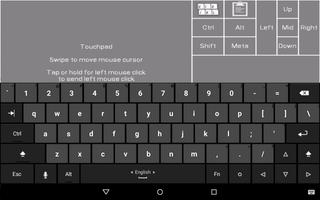
Works best with Hacker's Keyboard.
If you compiled the kernel for any device not listed here - contact me, I'll add your kernel to the list.
Experimental remote control functionality is available, with live camera feed, using built-in VNC server.
This feature requires to run VNC client on the other PC or Android device. There are many VNC clients for PC and Android, that can be downloaded from Google Play.
All sources are available at the github page listed above.








 Download