

Bead Loom Pattern Creator for your mobile device
Bead Loom Pattern Creator for your mobile device.
Comes with 4 free bead loom patterns. Download is free. To activate creation is $2.99
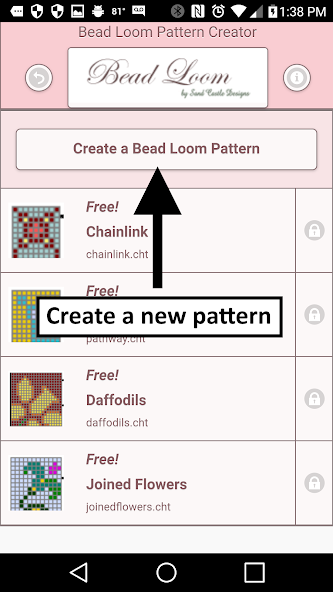
To create Bead Loom patterns, select Create a Bead Loom pattern button.
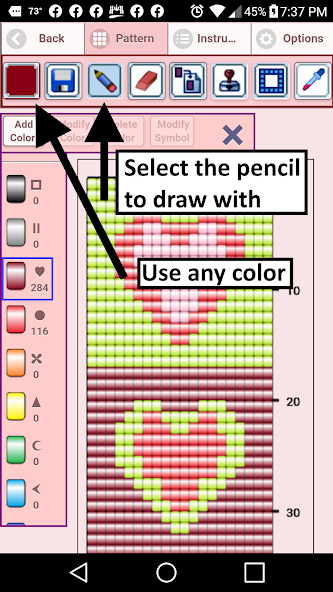
The Bead Loom pattern editor will appear. Fill in the squares with beads of any color.
To get started - Use the pencil to add beads to your bead loom pattern. Use the Eraser to remove beads from your pattern.
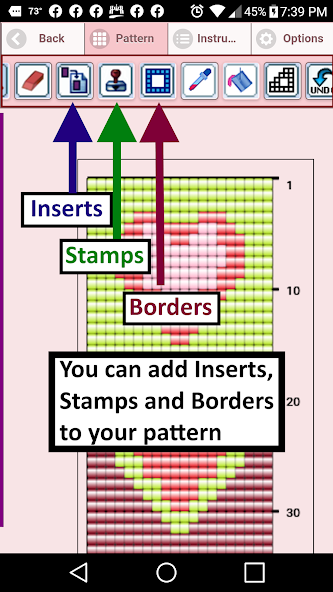
You also can select from over 400 stamps, inserts and borders to apply to your bead loom pattern.
Icons from left to right in the icon bar are:
Color icon - use to add new beads with different colors to your bead list.
Save icon - use to save your bead loom pattern
Pencil icon - use to add beads to your bead loom pattern
Eraser icon - use to remove beads from your bead loom pattern
Inserts icon - selectable list of bead patterns to add to your pattern (like roses)
Stamps icon - selectable little stamps (little bead designs) to add to your bead loom pattern
Borders icon - selectable borders to add to your bead loom pattern. Borders automatically wrap around your pattern.
Dropper icon - lets you extract a bead color from your pattern and add more of that bead to your bead loom pattern
Bucket icon - use to fill selected area with beads of the current color
Trim icon - remove squares from your bead loom pattern.
Undo icon - undo each last change you made to the bead loom pattern.
Redo icon - redo each changes you undid.
Cut icon - remove some beads from the pattern
Copy icon - copy some beads from the pattern
Paste icon - paste copied beads to the pattern
Zoom in icon - magnify the bead loom pattern
Zoom out icon - minify the bead loom pattern
Symbols icon - display a unique symbol on the bead to indicate it's color value
Picture icon - select a picture from your device and convert to a bead loom pattern
Social media icon - email etc. your pattern.
Trace icon - select a picture from your device and it displays over your bead loom pattern. Now you can trace it.
Resize bars - resize bars are display at the bottom right corner of your bead loom pattern. Drag them to resize your bead loom pattern












 Download