• halaman depan
  • permainan
    petualangan aksi Bisnis simulasi permainan peran Kompetisi olahraga Teka-teki kasual strategi kartu ritme musik Teka-teki kata penembakan penerbangan perkembangan cinta
  • aplikasi
    kantor bisnis Komunikasi dan sosial Gaya Hidup dan Hiburan belanja daring Alat utilitas perjalanan perjalanan manajemen keuangan pembelajaran pendidikan Pembacaan informasi Olahraga dan kesehatan
  • artikel

English 中文(简体) 中文(繁体) 한국어 日本語 Português Español Русский العربية Indonesia Deutsch Français ภาษาไทย
halaman depan aplikasi Alat utilitas Bead Loom Pattern Creator
Bead Loom Pattern Creator

Bead Loom Pattern Creator

1
2
3
4
5
unduh
  • Versi 4.0.2
  • kategori Alat utilitas
  • nama paket com.crochetdesigns.beadloom
  • Perbarui waktu June 15, 2025
  • ukuran 25.91MB
Tentang aplikasi ini

Bead Loom Pattern Creator for your mobile device

Bead Loom Pattern Creator for your mobile device.

Comes with 4 free bead loom patterns. Download is free. To activate creation is $2.99

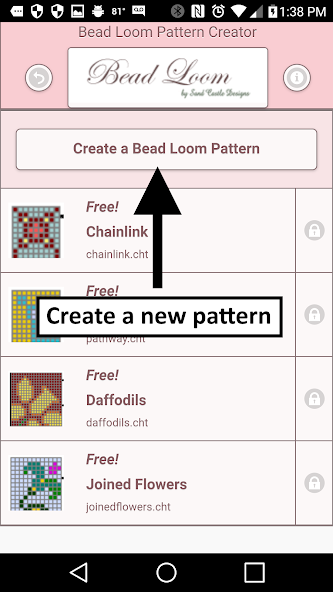
To create Bead Loom patterns, select Create a Bead Loom pattern button.

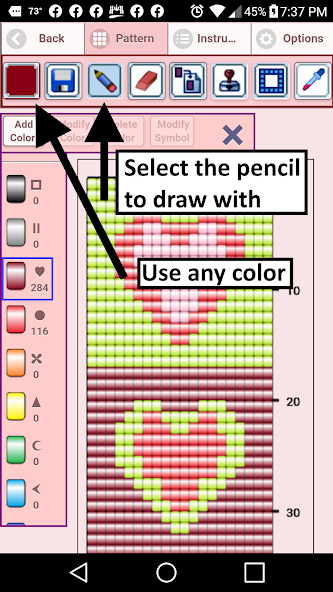
The Bead Loom pattern editor will appear. Fill in the squares with beads of any color.

To get started - Use the pencil to add beads to your bead loom pattern. Use the Eraser to remove beads from your pattern.

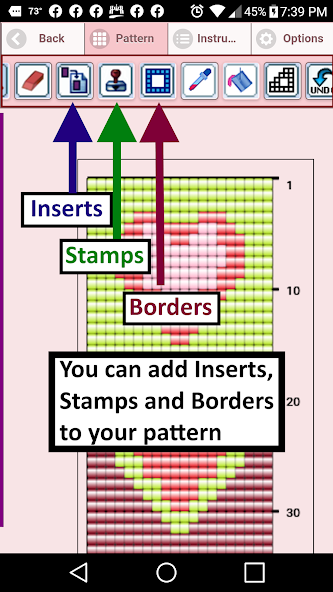
You also can select from over 400 stamps, inserts and borders to apply to your bead loom pattern.

Icons from left to right in the icon bar are:

Color icon - use to add new beads with different colors to your bead list.

Save icon - use to save your bead loom pattern

Pencil icon - use to add beads to your bead loom pattern

Eraser icon - use to remove beads from your bead loom pattern

Inserts icon - selectable list of bead patterns to add to your pattern (like roses)

Stamps icon - selectable little stamps (little bead designs) to add to your bead loom pattern

Borders icon - selectable borders to add to your bead loom pattern. Borders automatically wrap around your pattern.

Dropper icon - lets you extract a bead color from your pattern and add more of that bead to your bead loom pattern

Bucket icon - use to fill selected area with beads of the current color

Trim icon - remove squares from your bead loom pattern.

Undo icon - undo each last change you made to the bead loom pattern.

Redo icon - redo each changes you undid.

Cut icon - remove some beads from the pattern

Copy icon - copy some beads from the pattern

Paste icon - paste copied beads to the pattern

Zoom in icon - magnify the bead loom pattern

Zoom out icon - minify the bead loom pattern

Symbols icon - display a unique symbol on the bead to indicate it's color value

Picture icon - select a picture from your device and convert to a bead loom pattern

Social media icon - email etc. your pattern.

Trace icon - select a picture from your device and it displays over your bead loom pattern. Now you can trace it.

Resize bars - resize bars are display at the bottom right corner of your bead loom pattern. Drag them to resize your bead loom pattern
Apa yang baru di versi terbaru 4.0.2

Last updated on Dec 9, 2020 Bead Loom Creator - Create your own Bead Loom Patterns.
Added a trace feature. Now you can trace an image right on your pattern. Just select the trace button. When you are done tracing, just remove the image.
unduh(25.91MB)
Pengguna juga melihat
  • Cinche Gallery

    Cinche Gallery

    1.2.1 January 16, 2026
  • Length Fraction Calculator

    Length Fraction Calculator

    1.1 January 16, 2026
  • Kansas City Weather Radar KCTV

    Kansas City Weather Radar KCTV

    v4.35.1.1 January 16, 2026
  • topksk

    topksk

    1.3 January 16, 2026
  • TV Universal Control Remote

    TV Universal Control Remote

    5.0.2 January 15, 2026
  • weather warnings and alerts

    weather warnings and alerts

    16.6.0.6271_50157 January 15, 2026
  • Ruqyah

    Ruqyah

    2.3 January 14, 2026
  • All Photo Frames

    All Photo Frames

    1.10 January 13, 2026
  • MYAndroid Protection

    MYAndroid Protection

    2.0.68 January 13, 2026
  • CloudKeyz

    CloudKeyz

    1.1.8 January 13, 2026
  • Clock Tuner

    Clock Tuner

    3.20 January 13, 2026
  • Muzei - Dota

    Muzei - Dota

    1.0 January 13, 2026
  • dodol Keyboard

    dodol Keyboard

    1.86 January 12, 2026
  • Pollution Care

    Pollution Care

    1.6 January 12, 2026
  • Safe+ synchronizer

    Safe+ synchronizer

    1.09.1 January 12, 2026
About Privacy Policy Terms of Service Cooking Policy

© Copyright 2017-2026 downzs.com